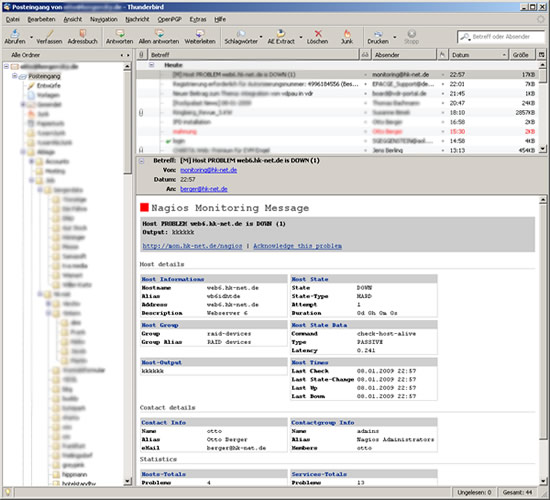
Ersatz für die von Nagios mitgelieferte Notification-Mail.
Eigentlich bin ich kein Fan von HTML-Mails, aber CSS-Formatierungen machen eine Notification-Mail schon übersichtlicher. Es wird aber auch eine Text-Variante für Handhelds etc. mitgesendet.
UPDATE: Now available here at my github profile!
Download: nagios_mail-0.9.zip (don’t use this, use the github page!)
Installation
Nach dem kopieren der nagios_mail.php müssen nur die Nagios-Notification-Definitionen geändert werden:
# /usr/local/nagios/etc/objects/misccommands.cfg
define command{
        command_name    host-notify-by-email
        command_line    /usr/bin/php -q /opt/nagios_mail.php
        }

define command{
        command_name    notify-by-email
        command_line    /usr/bin/php -q /opt/nagios_mail.php
        }
Je nach Distribution muss evt. der PHP-Pfad angepasst werden. Update: seit Version 0.3 ist PEAR nicht mehr notwendig!
Konfiguration
Im Header der PHP-Datei kann der Absender, die Nagios-URL oder das Subject geändert werden.
FAQ
Q: i want to use ICINGA with it. Is it possible?
A: Yes, but you have to replace in Line 643 “_NAGIOS” with “_ICINGA”
Q: Notifications through Nagios/Ichinga are empty. What to check?
A: check your php.ini for variables_order = “EGPCS”, the “E” is important.
Q: Notifications through Nagios/Ichinga are still empty. What to check?
A: check nagios.cfg/icinga.cfg for the following setting: enable_environment_macros=1
Changelog
0.9.0
  outlook 2007 html compatibility (back to stoneage)
  added color for UNKNOWN state

0.8.0
  added additional header configuration
  (for example to send high-priority mails)
  improved documentation
  improved debug mode

0.7.0
  fixed multipart issue (webmailer compatibility)
  added safari header (iPhone Mail compatibility)

0.6.0
  added subject templates
  added ability to disable sections

0.5.0
  added PHP4 compatibility

0.4.0
  added test-mode (if run from command-line)
  removed php-notices

0.3.0
  added readme
  removed Mail_mime dependency
  removed css definitions for webmail compatibility
  added links to hostname

0.2.0
  changed script to object oriented programming
146 replies on “Nagios Extended Notification Mail”
hmm ok mein fehler bekomm nun:
CONTACTEMAIL env-var is empty (not run from Nagios?) or ‘mail_add_to_address’ not configured (Testmode)
aber das problem ist das er trotzdem keine verschickt nur der test klappt
bin ratlos
Hast du mal die vorherigen Kommentare durchgesehen? Insb. zu Ichinga und php.ini…
also gut geht wieder… habe folgendes eingestellt:
system ist ubuntu server 10.04 lts / icinga 1.2.1 + icinga-web 1.2.1
==> /etc/php5/cli/php.ini
-> variables_order = “EGPCS” (line 669)
==> php-script bei mir /usr/local/icinga/mail/icinga_mail.php
-> $config[‘nagios_url’] = ‘http://icinga-ip/icinga-web’; (line 44)
-> $config[‘mail_from_address’] = ‘blub@blub.de’; (line 50)
-> $config[‘mail_add_to_address’] = ”; (line 58)
-> if (strpos($key, ‘ICINGA_’) !== false) { (line 648)
_______________________________________________________________________________
es lag bei mir einfach nur an EGPCS das hat der vorher auch mit GPCS gemacht! die lines entsprechen meiner config könnte abweichen also einfach nach bereich suchen… und vielen dank nochmal an otto für die schnelle antwort
hoffe das es anderen hilft.
gruß daniel
Is there a way to color code the Subject line?
Hi,
Is it possible to change the Subject Line to RED? Appreciate any help.
Thanks,
–john
Hi, unfortunately or for good reason the clients doesnt interpret html at the subject line. so this is not possible…
Hallo,
ist es möglich bei dem Host-/Servicenamen nicht nur den Namen sondern gleich einen Link zur Host-/Service-Status-Detail-Seite in der Nagios-Weboberfläche zu hinterlegen?
Danke für die Hilfe,
Patrick
Hallo, ist sicherlich möglich. Ich nehme das in die Liste für die nächste Version mit auf. Kann nur nicht versprechen, dass diese sehr schnell erscheint… Otto
Hallo,
bei mir werden die Statistics-Felder nicht ausgefüllt. Muss ich hierfür Änderungen am Nagios machen oder mache ich hier einfach nur etwas verkehrt.
Gruß
Markus
Hab das gleiche Problem wie Markus. Krieg nur eine E-Mail ohne ausgefüllte Statistikfelder
Bei mir wird keine Notification Mail erzeugt. Bei Aufruf über die Kommandozeile klappt es, Alarme über Nagios kommen nicht.
Im Nagios Log sind keine Fehler zu sehen:
[1302589983] SERVICE NOTIFICATION: xxx;ccc;vvv;CRITICAL;notify-service-by-email;0 years 0 mon 0 days 13 hours 17 min 20 sec
EGPCS in php.ini hat geholfen, Anfangs wurden nur ein paar Kommentare angezeigt, da hatte ich es nicht gesehen.
ich habe in er php.ini die variables_order auf EGPCS umgestellt. leider werden noch immer keine Emails versendet.
IM Nagioslog sind keine Fehler.
Testbenachtichtigung funktoniert.
Welche PHP Version verwendet ihr? Bei mir mit PHP5.3 klappt es auch nicht. Mit PHP5.2 funktionierts… Ich glaube der Fehler liegt in der $_ENV Funktion von PHP. Diese wurde ersetzt durch get_env…
So, doch nicht so kompliziert… Wie oben schon beschrieben. $_ENV wird einfach nicht gesetzt. Mit EGPCS in der php.ini kommen die Mails wieder an.
[…] zu installieren. Schwierger zu debuggen war allerdings warum die tolle Mailbenachrichtigung Nagios Extended Notification Mail nicht mehr geht. Im Debug-Modus geht sie, aber nicht wenn Icinga sie aufruft. Die Lösung habe ich […]
Ich habe bei mir zugegebenermaßen Icinga unter Debian laufen, aber sollte ja keinen Unterschied machen. Email kommen auch bei mir nicht an. Die Variable EGPCS ist bei mir mit “variables_order = “EGPCS”” gesetzt. Jemand noch eine andere Idee?
Hi, Du müsstest vermutl. im Code noch die Stelle “if (strpos($key, ‘NAGIOS_’)” durch “if (strpos($key, ‘ICINGA_’)” ersetzen.
Hi. Bei mir kommt immer die gleiche contactgroup info in der mail, egal ob auf Grund dieser contactgroup oder einer anderen gemeldet worden ist. Kann es sein das Nagios hier einen falschen Wert übergibt und wie könnte ich das prüfen? Danke! Gruß, Rev
So verändert bekomme ich zwar die ActionURL ausgegeben aber leider nicht den rest..
array(
‘name’ => ‘Performancdaten’,
‘nagios_env’ => ‘SERVICEACTIONURL’,
‘required’ => false,
‘type’ => ‘link’,
),
Soll bedeuten es kommt nur:
/pnp4nagios/graph?host=rechnername&srv=Memory+Usage’ class=’tips’ rel=’/pnp4nagios/popup?host=rechnername&srv=Memory+Usage
Schön wäre wenn da jetzt noch…
Die IP das Nagiosservers so … http://ip-adresse kommen würde.
Jemand eine Idee?
VG ;-)
ich habe die Extended Notification Mail eingerichtet. Die Testmail klappt wunderbar. Das war es aber auch, normale notifications kommen nicht an.
Ebenfalls habe ich “variables_order” in “EGPCS” in der php.ini geändert. Ohne Erfolg.
Ich verwende ICINGA und PHP5.3
Hi,
First thx for your work
I’ve a little problem with you script :
When a host or a service go CRITICAL i receive a mail (this is ok) but when a host or a service go to OK i don’t receive a mail .
Do you know why?
Thx
Habe auch ziemlich lange an dem Fehler:
CONTACTEMAIL env-var is empty (not run from Nagios?) or ‘mail_add_to_address’ not configured (Testmode)
gesucht.
Bei mir war in der icinga.cfg nicht
enable_environment_macros=1 gesetzt.
@Mark: Das wars!! Juppi!!!
English below… ;-)
Kleiner Hinweis an alle, bei denen keine Mails verschickt werden trotz angepasster php.ini: die nagios.cfg bzw icinga.cfg nach folgenden Wert prüfen:
enable_environment_macros=1
Stehts auf 0, funktioniert nagios_mail.php nicht.
A hint for everyone not recieving mails despite modified php.ini: check your nagios.cfg/icinga.cfg for the following setting:
enable_environment_macros=1
Is this set to “0”, the nagios_mail.php script won’t work.
Hi,
super Skript…
leider habe ich damit ein kleines Problem.
Der Testmodus funktioniert einwandfrei.
Lösche ich jedoch “mail_add_to_address” meine eMailadresse wieder raus, damit die echten mails verschickt werden, werden keine Mails verschickt.
Das Skript funktioniert also nur im Testmodus.
enable_environment_macros=1 und
“variables_order” in “EGPCS” habe ich überprüft.
“variables_order” in “EGPCS”
Nicht in /etc/php5/apache2/php.ini
sondern in /etc/php5/cli/php.ini editieren!
Hallo,
ich zweifle langsam an mir…
Habe das tolle Script seit langer Zeit in mehreren Icinga-Installationen im Einsatz.
Jetzt habe ich allerdings einen Clone davon in ein neues Netz gesetzt und an die örtlichen Gegebenheiten angepasst (Relayserver, Kontakte, Hostname usw.) und es wird einfach nicht mehr der im Script hinterlegte Absender verwendet. Es kommen immer nur Absender wie root@myserver.mydomain.local oder icinga@myserver.mydomain.local.
Ich setze Postfix ein mit den gleichen Einstellungen wie in den alten Installationen…
irgendwelche Ideen???
Matthias
Hmm, das kann eigentlich nur am Mailserver liegen bzw. am sendmail wrapper welchen PHP verwendet – dieser überschreibt vermutl. den “From:” Header wieder… Evt. mal testweise einen eigenen Wrapper in der php.ini eintragen und schauen/loggen was dort passiert… Otto
Hab jetzt das Problem eigekreist und einen Workaround gefunden:
Das Problem war nicht der “FROM:”-Header sondern der “Return Path”, den wollte der relayende Exchange-Server einfach nicht akzeptieren.
Hab dann hart in Zeile 793 die option -f mit der passenden Adresse eingefügt und schon passt es….
Matthias
If you want to use this with Icinga you need to de a replace:
“nagios_” => “icinga_”
“NAGIOS_” => “ICINGA_”
This is baecause ‘In Icinga the is ICINGA, in Nagios NAGIOS. This way your shell-script can obtain the hostname in question from the ICINGA_HOSTNAME or NAGIOS_HOSTNAME environment variable, respectively.” http://www.censhare.com/de/Pimping-NagiosIcinga-email-notifications-II-1042070.html
Das gleiche Problem wie REV oben beschrieben habe ich auch =)
Und zwar dass die Memers der Contact Group falsch oder unvollständig angezeigt werden…
Dazu habe ich einen Thread im Monitoring Portal erstellt:
Extended Mail Notification Plugin – Falsche Contact Group Informationen
http://www.monitoring-portal.org/wbb/index.php?page=Thread&threadID=27071
[…] 最近写了个Nagios的邮件报警插件,思想上是参考《Nagios Extended Notification Mail》 […]
[…] http://www.bergercity.de/linux/nagios-notification-mail […]
hi,
I used this script but i am not able to get info. about any host and service .
Kindly check below mail and help me out.
regards
nikhil
Nagios Monitoring Message
TESTMODE: [M] Host %%NOTIFICATIONTYPE%% %%HOSTNAME%% is %%HOSTSTATE%% (%%NOTIFICATIONNUMBER%%)
Output: HOSTOUTPUT
http://10.120.120.42/nagios
Host details
Host Informations
Hostname HOSTNAME
Alias HOSTALIAS
Address HOSTADDRESS
Description HOSTNOTES
URL HOSTNOTESURL
Host State
State HOSTSTATE
State-Type HOSTSTATETYPE
Attempt HOSTATTEMPT
Duration HOSTDURATION
Downtime HOSTDOWNTIME
Host Group
Group HOSTGROUPNAME
Group Alias HOSTGROUPALIAS
Group Alias HOSTGROUPNOTES
Group Alias HOSTGROUPNOTESURL
Host-Acknowledgement
Author HOSTACKAUTHOR
Comment HOSTACKCOMMENT
Host State Data
Command HOSTCHECKCOMMAND
Type HOSTCHECKTYPE
Latency HOSTLATENCY
Percentage HOSTPERCENTAGE
Host-Output
HOSTOUTPUT
Host Times
Last Check 04.04.2013 15:26
Last State-Change 04.04.2013 15:26
Last Up 04.04.2013 15:26
Last Down 04.04.2013 15:26
Last Unrechable 04.04.2013 15:26
Service details
Servive details
Service SERVICEDESC
Command SERVICECHECKCOMMA…
Type SERVICECHECKTYPE
Latency SERVICELATENCY
Percentage SERVICEPERCENTCHA…
Service Group
Group SERVICEGROUPNAME
Group Alias SERVICEGROUPALIAS
Notes SERVICEGROUPNOTES
Notes SERVICEGROUPNOTES…
Service-Acknowledgement
Author SERVICEACKAUTHOR
Comment SERVICEACKCOMMENT
Service State
State SERVICESTATE
State-Type SERVICESTATETYPE
Attempt SERVICEATTEMPT
Duration SERVICEDURATION
Downtime SERVICEDOWNTIME
Service-Output
SERVICEOUTPUT
Service Times
Last Check 04.04.2013 15:26
Last State-Change 04.04.2013 15:26
Last OK 04.04.2013 15:26
Last Critical 04.04.2013 15:26
Last Warning 04.04.2013 15:26
Last Unknown 04.04.2013 15:26
Contact details
Contact Info
Name CONTACTNAME
Alias CONTACTALIAS
Pager CONTACTPAGER
Contactgroup Info
Name CONTACTGROUPNAME
Alias CONTACTGROUPALIAS
Members CONTACTGROUPMEMBE…
Statistics
Hosts-Totals
Problems TOTALHOSTPROBLEMS
Problems Unhandled TOTALHOSTPROBLEMS…
Down TOTALHOSTSDOWN
Down Unhandled TOTALHOSTSDOWNUNH…
Unreachable TOTALHOSTSUNREACH…
Unreachable Unhandled TOTALHOSTSUNREACH…
Up TOTALHOSTSUP
Services-Totals
Problems TOTALSERVICEPROBL…
Problems Unhandled TOTALSERVICEPROBL…
Critical TOTALSERVICESCRIT…
Critical Unhandled TOTALSERVICESCRIT…
Unknown TOTALSERVICESUNKN…
Unknown Unhandled TOTALSERVICESUNKN…
Warning TOTALSERVICESWARN…
Warning Unhandled TOTALSERVICESWARN…
OK TOTALSERVICESOK
hello, excellent tool for nagios emails.
I have a problem and I hope I can help.
After updating my debian to “debian wheezy”, I have lost the support of php-suhosin, (debian wheezy and does not support it). without it you can not send email using their plugins.
Know of any way I can fix it??
thank you very much
wir haben ein Update auf Nagios 3.5.0 und da kommen keine Mails mehr mit dem php Script raus … die normale Notification funktioniert … hat schon mal jemand mit 3.5.0 getestet??
Danke für die Hilfe
Q: i want to use ICINGA with it. Is it possible?A: Yes, but you have to replace in line 643 "_NAGIOS" with "_ICINGA"
^^ this is incorrect, it should be:
A: Yes, but you have to replace in line 643 "NAGIOS_" with "ICINGA_"Great script otherwise. Works fine with Icinga 1.9.3
Thanks!!
h
Ist das Script mit Outlook 2010 kompatibel?
THx
Marco
ja ist kompatibel. Gruß Otto.
Ich habe nun das Script angepasst (Nagios URL, mail_add_to_addres)
Die variables_order und environmet_makros haeb ich gecheckt…passt.
Wenn ich das Script manuell ausführe ./nagios_mail-php bekommen ich einbe ganze Latte von Error Messages.
: No such file or directory?php
: No such file or directory/**
./nagios_mail.php: line 3: apache2: command not found
: command not foundline 4: *
./nagios_mail.php: line 5: apache2: command not found
: command not foundline 6: *
./nagios_mail.php: line 7: apache2: command not found
: command not foundline 8: *
./nagios_mail.php: line 9: apache2: command not found
./nagios_mail.php: line 10: apache2: command not found
: command not foundline 11: *
: command not foundline 12: *
./nagios_mail.php: line 13: apache2: command not found
./nagios_mail.php: line 14: apache2: command not found
./nagios_mail.php: line 15: apache2: command not found
./nagios_mail.php: line 16: apache2: command not found
./nagios_mail.php: line 17: apache2: command not found
: command not foundline 18: *
./nagios_mail.php: line 19: apache2: command not found
./nagios_mail.php: line 20: apache2: command not found
./nagios_mail.php: line 21: apache2: command not found
./nagios_mail.php: line 22: apache2: command not found
: command not foundline 23: *
: command not foundline 24: *
./nagios_mail.php: line 25: apache2: command not found
: command not foundline 26: *
./nagios_mail.php: line 27: apache2: command not found
: command not foundline 28: *
: command not foundline 29: *
./nagios_mail.php: line 30: otto@bergerdata.de: No such file or directory
./nagios_mail.php: line 31: apache2: command not found
./nagios_mail.php: line 32: apache2: command not found
./nagios_mail.php: line 33: apache2: command not found
: No such file or directory */
: command not foundline 35:
: command not foundline 36:
./nagios_mail.php: line 37: //: is a directory
: command not foundline 38:
: No such file or directory /**
./nagios_mail.php: line 40: apache2: command not found
: command not foundline 41: *
./nagios_mail.php: line 42: apache2: command not found
: No such file or directory */
./nagios_mail.php: line 44: [nagios_url]: command not found
: command not foundline 44:
: command not foundline 45:
: No such file or directory /**
./nagios_mail.php: line 47: apache2: command not found
: command not foundline 48: *
: No such file or directory */
./nagios_mail.php: line 50: [mail_from_address]: command not found
: command not foundline 50:
: command not foundline 51:
: No such file or directory /**
./nagios_mail.php: line 53: apache2: command not found
: command not foundline 54: *
./nagios_mail.php: line 55: apache2: command not found
./nagios_mail.php: line 56: syntax error near unexpected token `(‘
‘/nagios_mail.php: line 56: `* from command-line (and not run from nagios)
Ich habe Nagios 3.1.4. auf SUSE EL11 im Einsatz.
Das Script habe ich kopiert nach /etc/php5, oder muss es nach /usr/bin ?
Merci
Marco
Hallo Otto,
ich habe nun soweit alles hingegriegt. Nun allerdings wenn ich das Script verwenden möchte um die echten Notifications zu versenden wird kein Inhalt angezeigt.
Im Testmodus klappt es wunderbar.
Environment_makros =1
variables_order = EGPCS
Hast du noch einen Tipp für mich?
Gruß
Marco
kann mir von euch jemand sagen wie ich die contacts.cfg bearbeiten muss damit die defibnierten kontkte und -gruppen ihre mails zugeschickt bekommen?
Danke und Gruß
Marco
it’s possible to run this script with centreon-engine?
I test, but it’s always testmode email who was send…
Hab das Plugin Installiert, mir ist jedoch schleierhaft wie das Script die Daten an Sendmail weitergibt, wie oder wo konfigurier ich das?
Hallo ,
ein cooles Scipt muss ich schon sagen und nach 1-2 lesen der FAQ läuft es ;)
Bei mir hat es an der cli/php.ini gelegen ;)
Default ist der auf “GPCS”
Vielen Dank
icinga-web/v1.11.0 / Icinga 1.11.3